Skip to content
Ultimate Second Brain (PKM) product render
Notion Template

Ultimate Second Brain (PKM)

A complete PARA-based knowledge management system with 6 linked databases — capture, organise, and retrieve your ideas.

$19

one payment · duplicate into your workspace

  • Works with free Notion plan
  • Instant duplicate link
  • Full commercial use
  • 24-hour email support

Secure checkout via Stripe · Instant delivery

Template Overview

About Ultimate Second Brain (PKM)

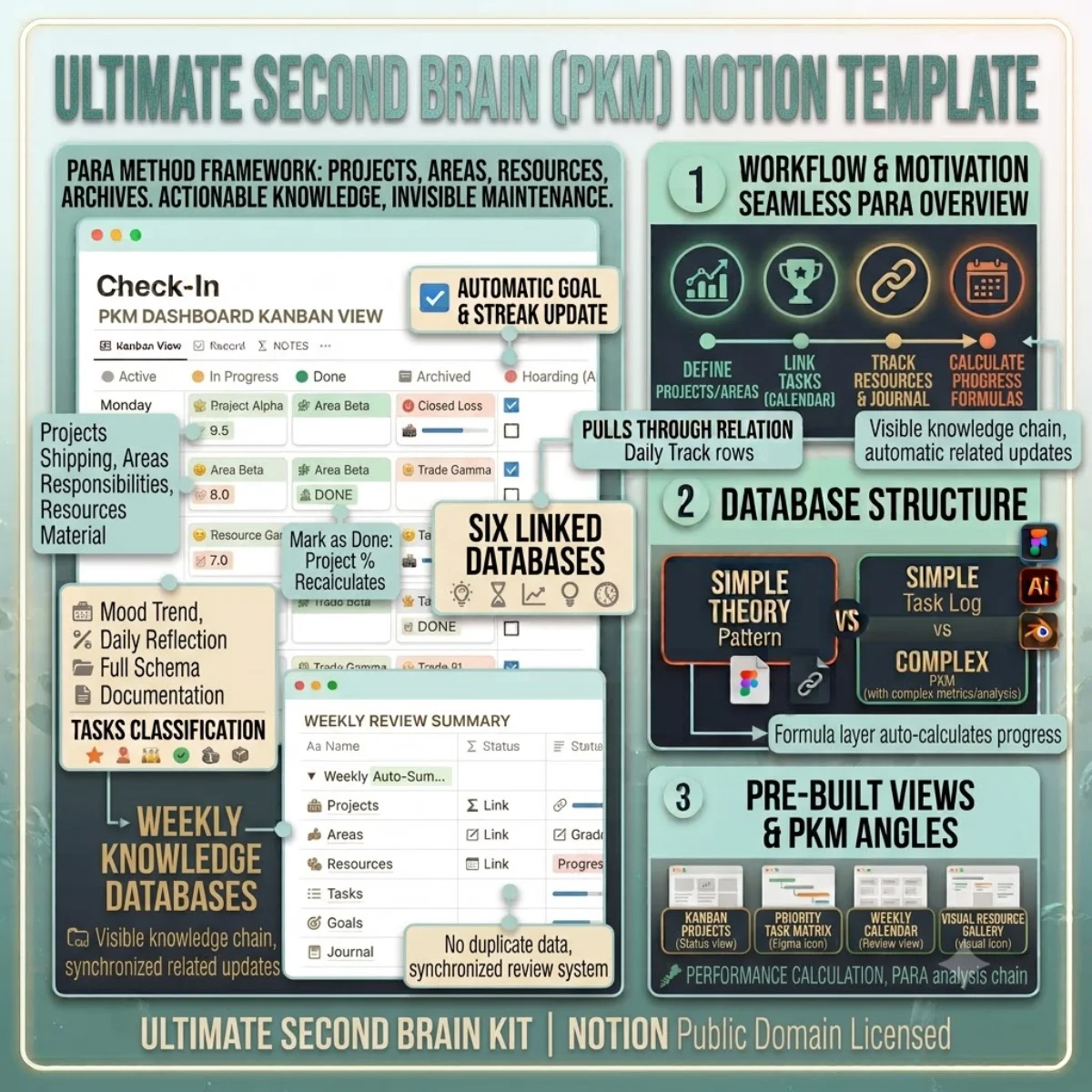
A second brain is only useful if you actually use it. This template is built around the PARA method (Projects, Areas, Resources, Archives) because that framework focuses on actionability over hoarding. Every database has a job: Projects holds what you are actively shipping, Areas tracks your recurring responsibilities, Resources stores reference material, Tasks breaks work into steps, Goals keeps your targets visible, and Journal captures daily reflection.

The six databases are pre-linked with relations and rollups so your progress bars update automatically. Mark a task as Done in the Tasks database and the linked Project’s completion percentage recalculates. Log a daily Journal entry and the mood trend populates your Dashboard view. No manual syncing, no duplicate data entry.

The template ships with four ready-to-use views: a Kanban board for project status, a priority matrix for tasks, a calendar for weekly reviews, and a gallery for browsing resources visually. You also get the full schema documentation so you understand how every property, relation, and formula works before you start customising.
Getting started

Duplicate and go.

Every template ships as a Notion share link. Click duplicate, choose your workspace, and the entire structure — databases, views, formulas, and relations — is ready to use. No setup, no configuration.

1. Click duplicate

Open the share link and hit Duplicate in the top-right corner of Notion.

2. Choose workspace

Select your personal or team workspace. The full structure copies in seconds.

3. Start using it

All databases, views, and formulas are ready. Customise anything.

License & Delivery

Instant & secure delivery

Every template is delivered instantly. After purchase, you receive a Notion share link on the download page and via email. Click the link, duplicate into your workspace, and the entire system is ready — databases, views, formulas, and relations.

You can customise, extend, and use the template in both personal and commercial projects. The structure is yours to modify. You may not resell or redistribute the template itself.

Read the license FAQ

One price, no surprises

$19

per template · lifetime access

  • Instant duplicate link
  • Full commercial use
  • Works on free Notion plan
  • 24-hour email support
Ultimate Second Brain (PKM) — FAQ

Common questions.

Is this a read-only template or can I edit it?
You own the duplicate. Every database, view, property, and formula is fully editable. Add new columns, change the picklist options, restructure the relations — it is your workspace now.
Does this work with the free Notion plan?
Yes. The template uses standard Notion features (databases, relations, rollups, formulas) that work on the free plan. No paid add-ons required.
Can I delete databases I do not need?
Absolutely. Each database is independent. If you do not need the Journal or Goals modules, delete them without affecting the rest of the system.
How do I get the template into my workspace?
After purchase, you receive a Notion share link. Open it in your browser and click Duplicate in the top-right corner. Choose your workspace — the entire structure copies over in seconds.
Duplicate once, use forever

Buy Ultimate Second Brain (PKM) — one payment, lifetime access.

You own the duplicate. Customise every database, view, and formula. Use it in personal and commercial projects. Full Notion free plan compatibility included.