Skip to content
Meal Planner and Groceries product render
Notion Template

Meal Planner and Groceries

Plan meals, auto-generate grocery lists, manage your pantry — all linked in one Notion workspace.

$14

one payment · duplicate into your workspace

  • Works with free Notion plan
  • Instant duplicate link
  • Full commercial use
  • 24-hour email support

Secure checkout via Stripe · Instant delivery

Template Overview

About Meal Planner and Groceries

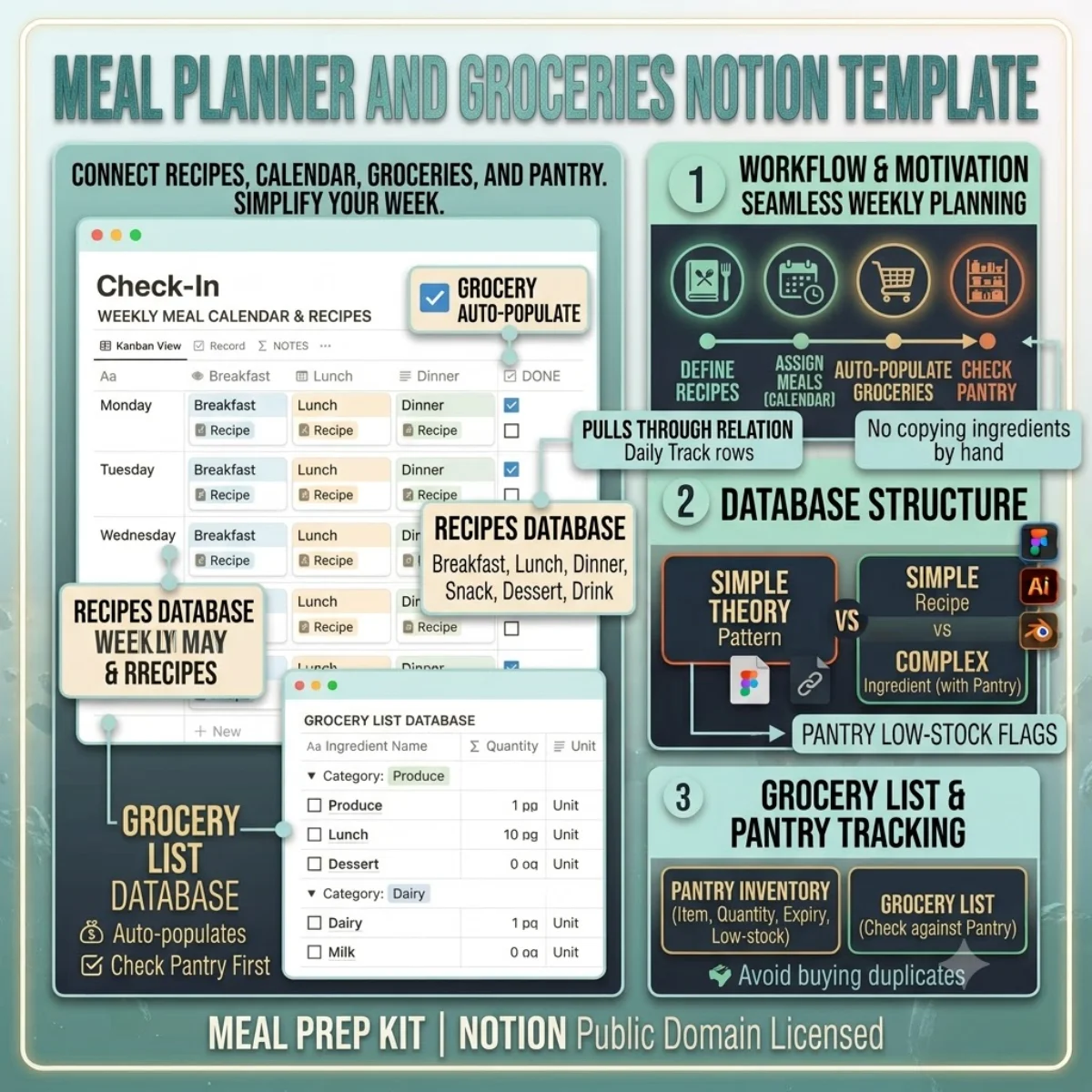
Meal planning should make your week easier, not add another spreadsheet to maintain. This template connects your recipe collection, weekly meal calendar, grocery list, and pantry inventory so nothing gets overlooked.

The Recipes database is your cookbook. Each recipe captures name, category (breakfast, lunch, dinner, snack, dessert, drink), cuisine, prep and cook times, servings, difficulty, instructions, and dietary tags. The Ingredients relation links each recipe to the Recipe Ingredients bridge table, which maps every ingredient to a master Ingredients database with categories and units.

The Meal Plan database is your weekly calendar. Assign a recipe to each day and meal type, and the Grocery List database auto-populates with the ingredients you need, grouped by category. No more copying ingredients by hand from recipe to shopping list.

The Pantry database tracks what you already have — item, quantity, unit, expiry date, and low-stock flag. When you build your grocery list, check your pantry first to avoid buying duplicates.
Getting started

Duplicate and go.

Every template ships as a Notion share link. Click duplicate, choose your workspace, and the entire structure — databases, views, formulas, and relations — is ready to use. No setup, no configuration.

1. Click duplicate

Open the share link and hit Duplicate in the top-right corner of Notion.

2. Choose workspace

Select your personal or team workspace. The full structure copies in seconds.

3. Start using it

All databases, views, and formulas are ready. Customise anything.

License & Delivery

Instant & secure delivery

Every template is delivered instantly. After purchase, you receive a Notion share link on the download page and via email. Click the link, duplicate into your workspace, and the entire system is ready — databases, views, formulas, and relations.

You can customise, extend, and use the template in both personal and commercial projects. The structure is yours to modify. You may not resell or redistribute the template itself.

Read the license FAQ

One price, no surprises

$14

per template · lifetime access

  • Instant duplicate link
  • Full commercial use
  • Works on free Notion plan
  • 24-hour email support
Meal Planner and Groceries — FAQ

Common questions.

How does the grocery list auto-populate?
When you add a recipe to the Meal Plan calendar, the Grocery List database pulls the recipe's ingredients through the relation chain. Each ingredient appears as a grocery item with the correct amount and unit.
Can I handle leftovers or meal prep?
Yes. In the Meal Plan, adjust the Servings field for batch cooking. Leftovers can be added as a "Leftovers" recipe entry without duplicating the ingredient data.
Does it support dietary restrictions?
The Tags multi-select on Recipes covers Vegetarian, Vegan, Gluten-Free, High Protein, and more. Use the filter to find recipes that match your dietary needs.
How do I track what I already have in my pantry?
The Pantry database tracks item, quantity, unit, category, and expiry date. Check the Low Stock flag when you are running low. The Grocery List will highlight items you already have vs. need to buy.
Duplicate once, use forever

Buy Meal Planner and Groceries — one payment, lifetime access.

You own the duplicate. Customise every database, view, and formula. Use it in personal and commercial projects. Full Notion free plan compatibility included.