Skip to content
Trader Master Journal product render
Notion Template

Trader Master Journal

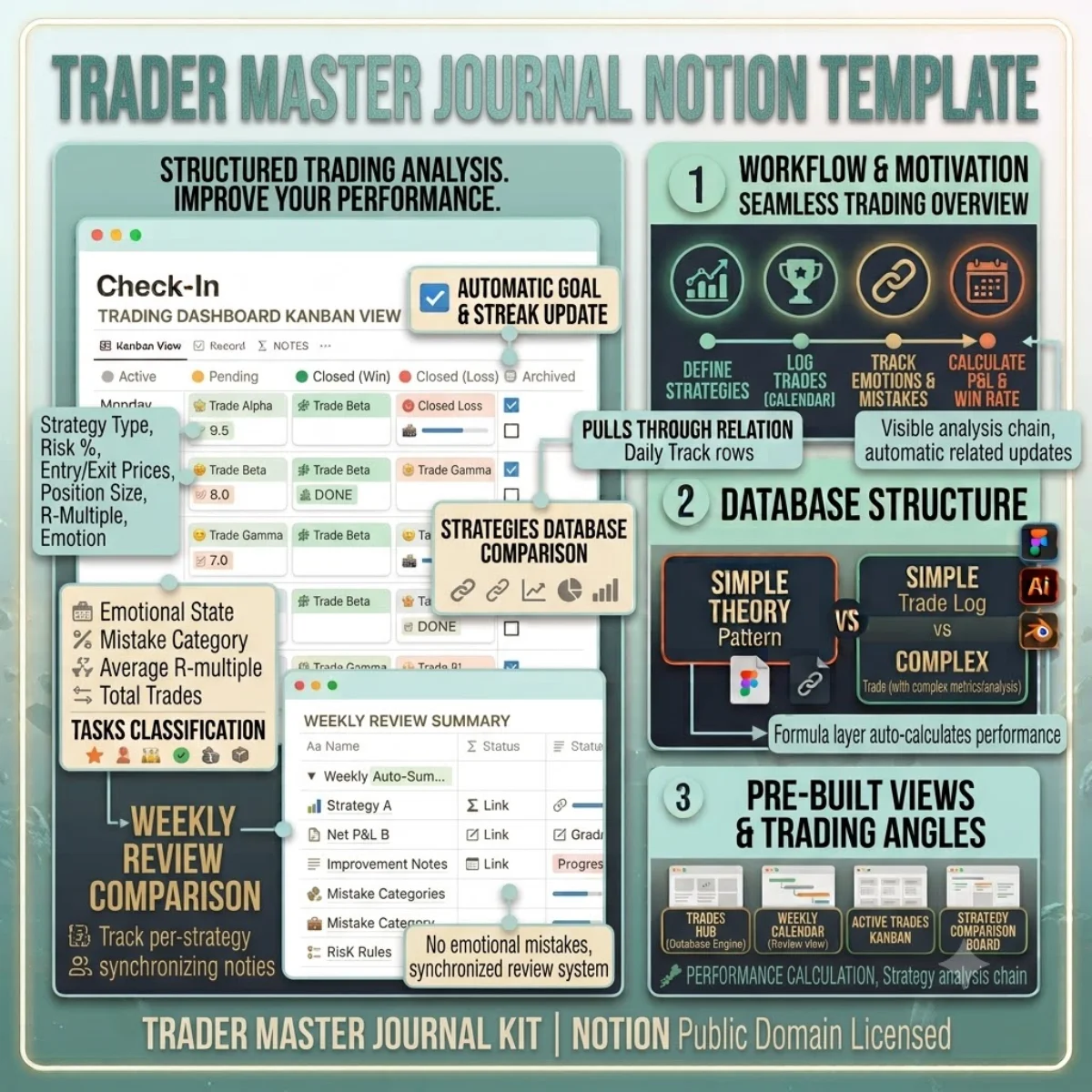
A professional trading journal — log every trade with price, risk, emotion, and strategy data. Formulas calculate your win rate and P&L automatically.

$22

one payment · duplicate into your workspace

  • Works with free Notion plan
  • Instant duplicate link
  • Full commercial use
  • 24-hour email support

Secure checkout via Stripe · Instant delivery

Template Overview

About Trader Master Journal

The difference between a trader who improves and one who stays flat is the journal. This template gives you a structured place to log every trade with the metrics that actually matter for analysis: entry and exit prices, position size, risk percentage, R-multiple, strategy type, emotional state, and mistake category.

The Trades database is the core. Each trade gets a unique ID, instrument type, direction, entry and exit dates, prices, and calculated P&L. The Strategy field links to a separate Strategies database so you can compare performance across approaches over time. The Emotion Entry and Emotion Exit fields track your psychological state — pattern recognition here is often the edge that technical analysis alone misses.

The Weekly Review database auto-summarises your trading week using rollups: total trades, win rate, net P&L, and improvement notes. The Strategies database tracks per-strategy win rates and average R-multiple, so you know which setups are actually worth your capital. The Risk Rules database keeps your position sizing guidelines front and centre.
Getting started

Duplicate and go.

Every template ships as a Notion share link. Click duplicate, choose your workspace, and the entire structure — databases, views, formulas, and relations — is ready to use. No setup, no configuration.

1. Click duplicate

Open the share link and hit Duplicate in the top-right corner of Notion.

2. Choose workspace

Select your personal or team workspace. The full structure copies in seconds.

3. Start using it

All databases, views, and formulas are ready. Customise anything.

License & Delivery

Instant & secure delivery

Every template is delivered instantly. After purchase, you receive a Notion share link on the download page and via email. Click the link, duplicate into your workspace, and the entire system is ready — databases, views, formulas, and relations.

You can customise, extend, and use the template in both personal and commercial projects. The structure is yours to modify. You may not resell or redistribute the template itself.

Read the license FAQ

One price, no surprises

$22

per template · lifetime access

  • Instant duplicate link
  • Full commercial use
  • Works on free Notion plan
  • 24-hour email support
Trader Master Journal — FAQ

Common questions.

Can I track multiple accounts with this journal?
Yes. Add an Account property to the Trades database (single-select or relation) and filter your views by account. The weekly review rollups will respect the filter.
How are the formulas calculated?
The R Multiple formula uses your entry price, stop loss, and position size. Win Rate divides winning trades by total trades. Net P&L sums all trade profits and losses. All formulas are documented in the schema reference.
Does this work for crypto trading?
Yes. Crypto is one of the instrument types. Enter prices in USD or USDT as the base currency and the formulas work the same as for Forex or Stocks.
Can I add screenshots from my trading platform?
Yes. The Trades database has a Screenshot files column. Drag and drop chart images directly onto each trade entry.
Duplicate once, use forever

Buy Trader Master Journal — one payment, lifetime access.

You own the duplicate. Customise every database, view, and formula. Use it in personal and commercial projects. Full Notion free plan compatibility included.