Skip to content
Project Management Board product render
Notion Template

Project Management Board

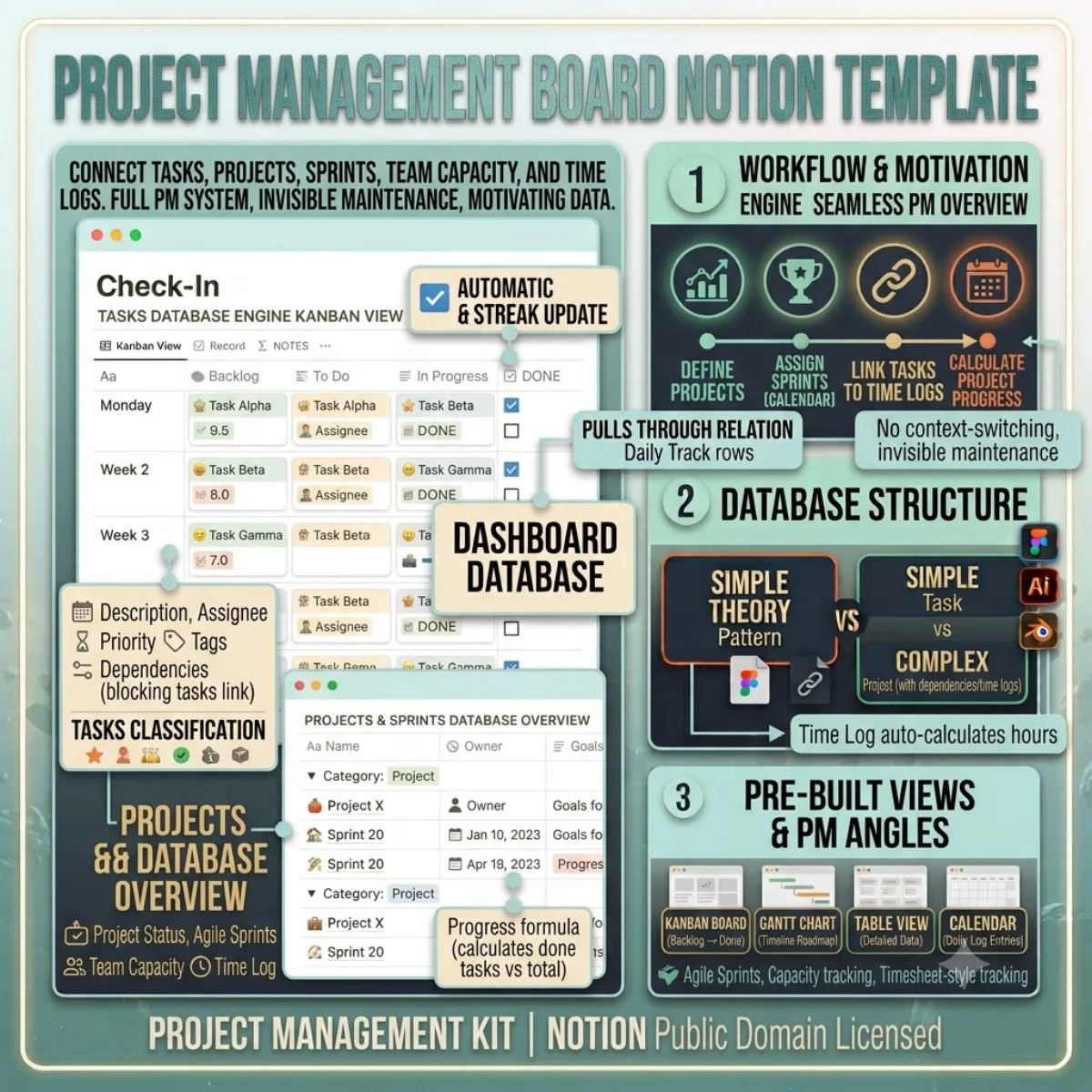
A full PM system inside Notion — Kanban boards, sprint planning, dependency mapping, time tracking, and team workload views.

$19

one payment · duplicate into your workspace

  • Works with free Notion plan
  • Instant duplicate link
  • Full commercial use
  • 24-hour email support

Secure checkout via Stripe · Instant delivery

Template Overview

About Project Management Board

Project management tools are a crowded space, but most add complexity you do not need. This template gives you a full system inside Notion — where your documentation, wikis, and meeting notes already live — so you are not context-switching between a PM tool and your knowledge base.

The Tasks database is the engine. Each task has a status (Backlog → To Do → In Progress → In Review → Done → Archived), priority, assignee, project and sprint links, estimated and logged hours, tags, description, acceptance criteria, dependencies, and comments. The Dependencies relation lets you link blocking tasks so the chain is visible.

The Projects database provides the overview. Track project status (Planning, Active, On Hold, Completed, Cancelled), owner, dates, and goals. The Progress formula calculates completion based on done tasks vs total tasks.

The Sprints database enables agile planning with start/end dates, goals, points, and completed points rollups. The Team database tracks member roles and sprint capacity. The Time Log database captures daily hours against specific tasks for timesheet-style tracking.
Getting started

Duplicate and go.

Every template ships as a Notion share link. Click duplicate, choose your workspace, and the entire structure — databases, views, formulas, and relations — is ready to use. No setup, no configuration.

1. Click duplicate

Open the share link and hit Duplicate in the top-right corner of Notion.

2. Choose workspace

Select your personal or team workspace. The full structure copies in seconds.

3. Start using it

All databases, views, and formulas are ready. Customise anything.

License & Delivery

Instant & secure delivery

Every template is delivered instantly. After purchase, you receive a Notion share link on the download page and via email. Click the link, duplicate into your workspace, and the entire system is ready — databases, views, formulas, and relations.

You can customise, extend, and use the template in both personal and commercial projects. The structure is yours to modify. You may not resell or redistribute the template itself.

Read the license FAQ

One price, no surprises

$19

per template · lifetime access

  • Instant duplicate link
  • Full commercial use
  • Works on free Notion plan
  • 24-hour email support
Project Management Board — FAQ

Common questions.

Is this suitable for agile teams?
Yes. The Sprints database supports sprint planning with start/end dates, goals, and point tracking. The Tasks database has status columns that map to your agile workflow.
Can I use it for personal projects too?
Absolutely. Skip the Team and Sprints databases for solo work. The Tasks and Projects databases work perfectly for individual project management.
How are task dependencies visualised?
The Dependencies relation links one task to another. In a Board or Table view, you can add a linked column to see what blocks what. The Timeline view helps visualise dependency chains.
Can team members comment on tasks?
Yes. The Comments database links to Tasks and Authors. Each comment captures the author, date, and body text for threaded discussions.
Duplicate once, use forever

Buy Project Management Board — one payment, lifetime access.

You own the duplicate. Customise every database, view, and formula. Use it in personal and commercial projects. Full Notion free plan compatibility included.